How to Stop Developers from Ignoring Security Findings (And Fix Vulnerabilities Faster)
Security tools have a reputation for being noisy barriers. When a developer pushes code, and the CI/CD pipeline fails with a 500-page PDF report attached, their natural reaction isn’t to fix the issues. It is to ignore them or force-merge the code.
This alert fatigue is quantifiable. Industry data shows that 33% of DevOps teams waste more than half their time addressing false positives. The problem isn’t that developers don’t care about security. The problem is that the developer experience (DevEx) of most security tools is broken. They scan too late, provide too little context, and demand too much manual research.
Here is how to solve the workflow problem by moving security into the CI/CD pipeline.
Why It Matters: The “30-Minute vs. 15-Hour” Rule
Ignoring security findings creates a compounding debt that kills velocity.
Data from NIST suggests that if a developer fixes a security flaw during the Pull Request (PR) review, it takes about 30 minutes. If that same flaw is caught in post-production testing, it takes upwards of 15 hours to triage, re-learn the context, and fix.
In terms of cost, fixing vulnerabilities in post-production is 30 times more expensive than the development stage.
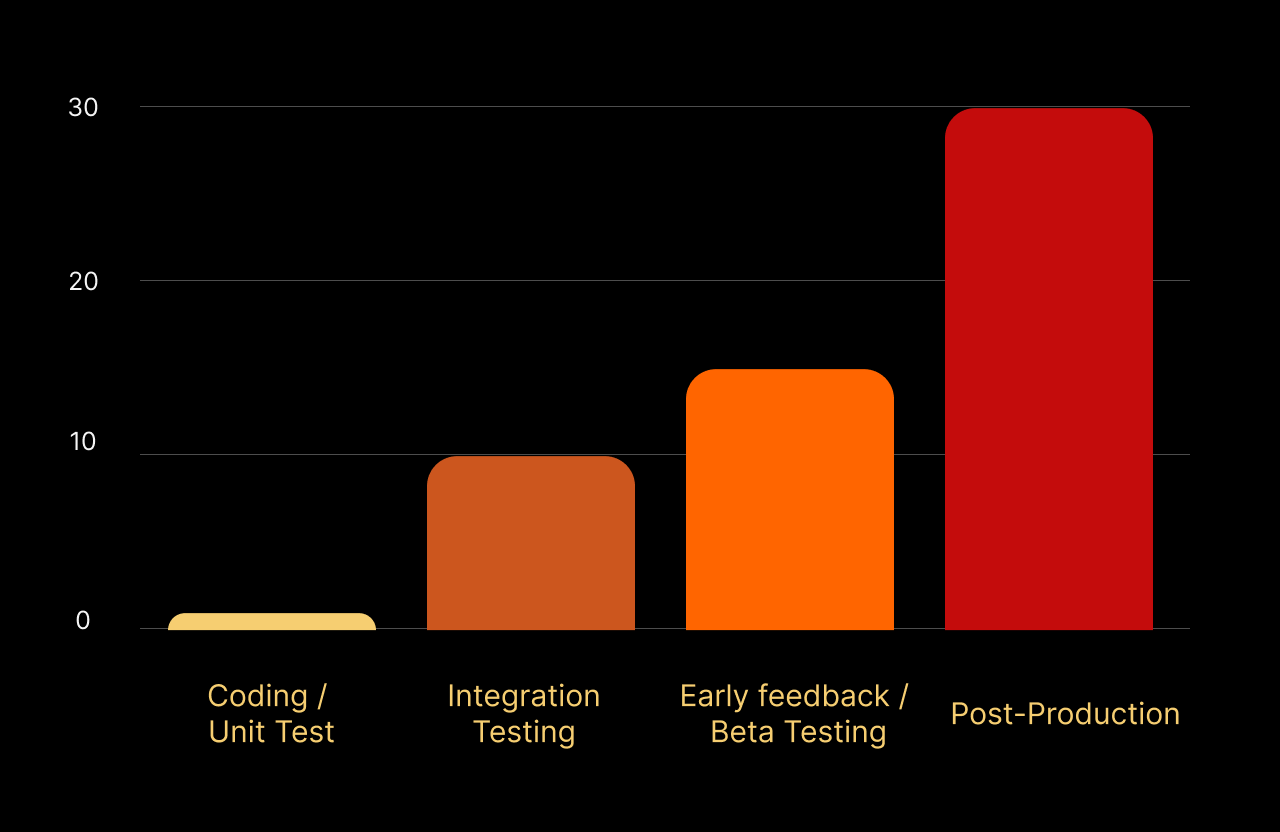
For engineering leads, the business case is clear: Improving the security of DevEx isn’t just about safety; it is about reclaiming 30% of your team’s engineering capacity.
How to Fix the Workflow
The goal is to move from “finding bugs” to “fixing bugs” without leaving the Pull Request interface.
Step 1: Detect Secrets & Code Issues
Legacy tools often scan nightly. By then, the developer has context-switched to a new task. You need to shift detection to the exact moment code is pushed to the server.
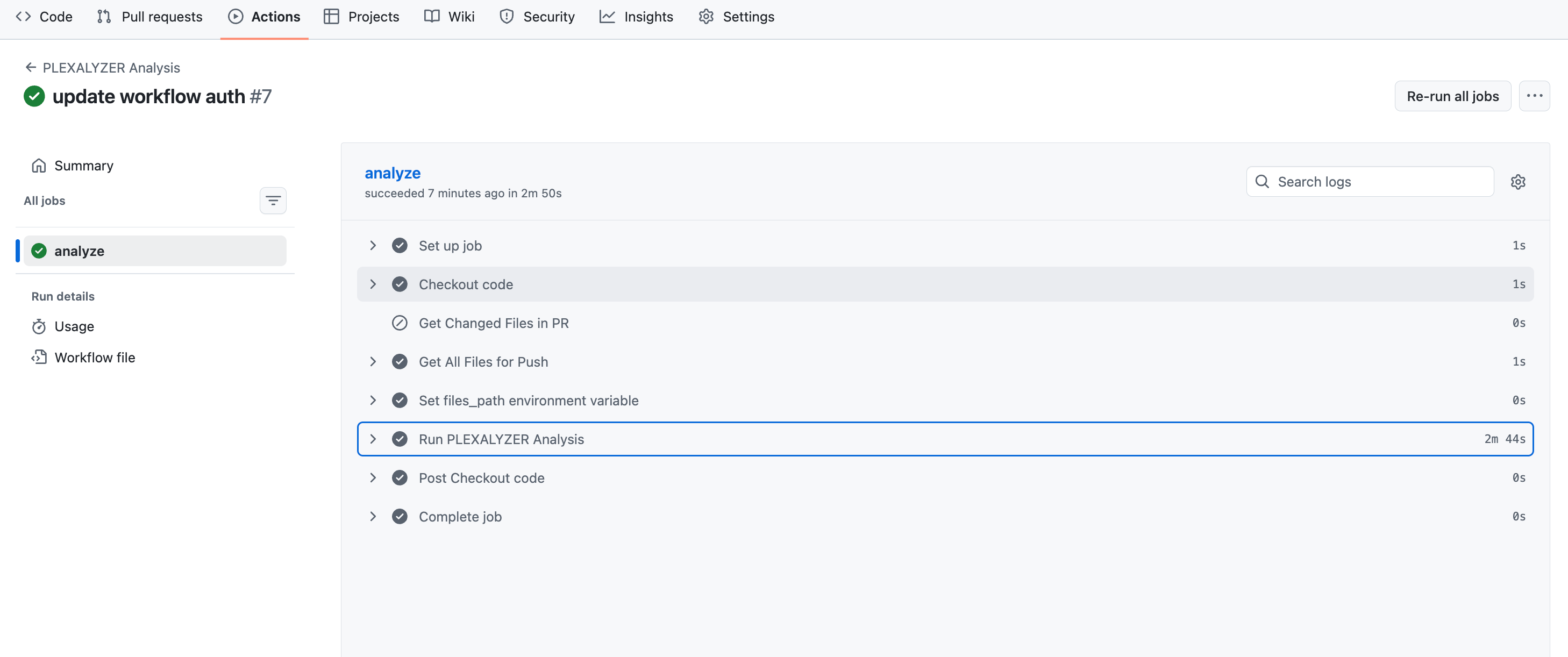
In Plexicus, you can integrate the security tools inside the CI/CD pipeline. It will scan immediately upon a Pull Request. It performs Secrets detection in your code (Git) and Static code analysis (SAST).
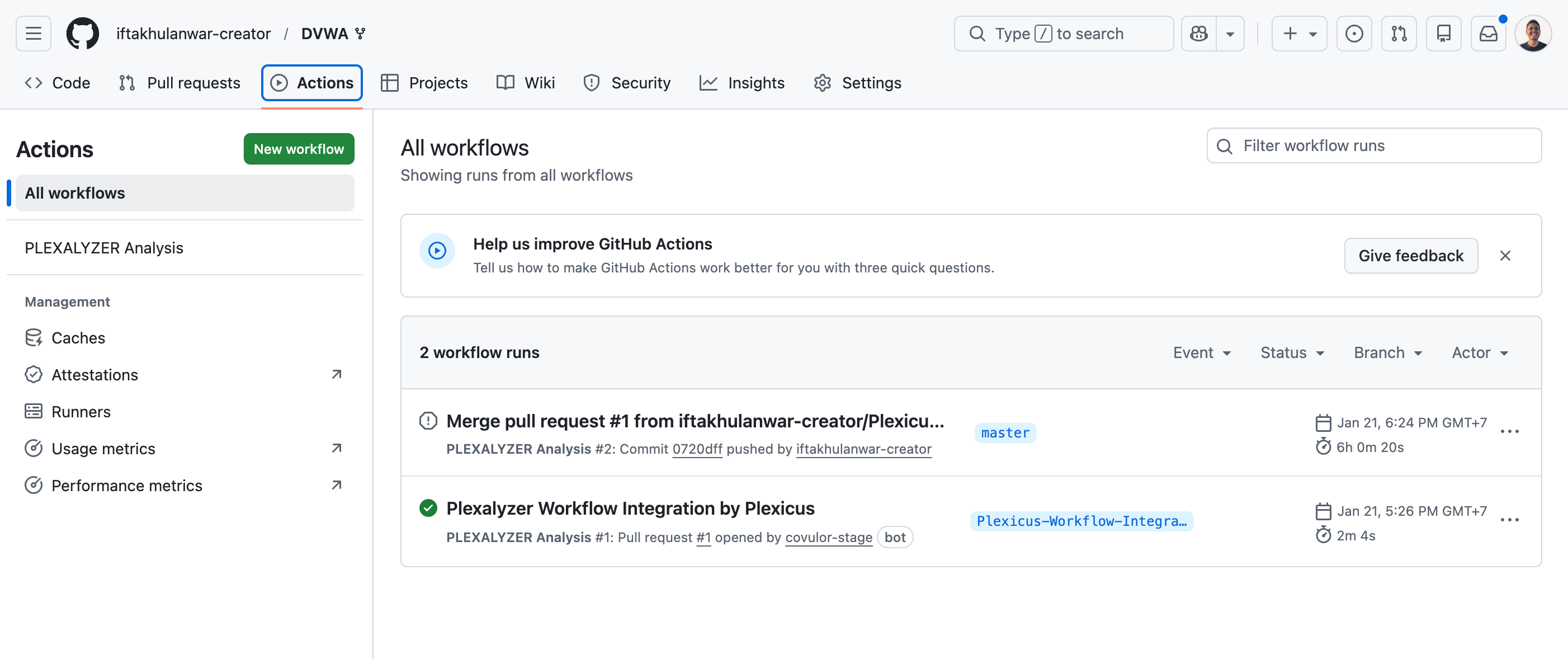
You can integrate Plexicus in the CI/CD pipeline by following these steps.
Step 2: Prioritization
Avoid alert fatigue. Do prioritization for security issues found.
Plexicus offers metrics to help you decide which vulnerabilities to tackle first:
a) Priority metrics
What it measures: How urgent it is to fix the issue
It is a score (0-100) that combines technical severity (CVSSv4), business impact, and exploit availability into one number. It’s your action queue - sort by Priority to know what to tackle immediately. Priority 85 means “drop everything and fix this now”, while Priority 45 means “schedule it for next sprint.”
Example: Remote Code Execution (RCE) in a deprecated staging service
A legacy staging service contains a Remote Code Execution vulnerability. The service is technically still running but is not used, not connected to production, and is only accessible from an internal IP allowlist.
- CVSSv4: 9.8 (critical technical severity)
- Business Impact: 30 (no production data, no customer impact, deprecated service)
- Exploit Availability: 35 (requires internal network access and service-specific knowledge)
- Priority: 42
Why Look for Priority:
On paper, CVSSv4 (9.8) screams “critical.” If you looked only at CVSS, this would trigger panic and fire drills.
Priority (42) tells the real story.
Because the service is deprecated, isolated from production, and holds no sensitive data, the actual risk to the business is low. Priority correctly downgrades urgency and says:
“Fix this during scheduled cleanup or decommissioning, not an emergency.”
This helps teams avoid wasting time pulling engineers off critical work to fix a vulnerability in a system that’s already on its way out.
b) Impact
What it measures: Business consequences
Impact (0-100) evaluates what happens if the vulnerability is exploited, considering your specific context: data sensitivity, system criticality, business operations, and regulatory compliance.
Example: Hardcoded cloud credentials exposed in a repository
A set of cloud access keys is accidentally committed to a Git repository.
- Impact 90: Keys belong to a production cloud account with permission to read customer data and create infrastructure. Exploitation could lead to data breaches, service disruption, and compliance violations.
- Impact 25: Keys belong to a sandbox account with no sensitive data, strict spending limits, and no access to production systems. Even if abused, the business impact is minimal.
Why Impact Matters:
The vulnerability is the same: exposed credentials, but the business consequences are radically different. Impact scores reflect what the attacker can actually affect, not just what went wrong technically.
c) EPSS
What it measures: Real-world threat likelihood
EPSS is a score (0.0-1.0) that predicts the probability that a specific CVE will be exploited in the wild within the next 30 days
Example: Two vulnerabilities with very different real-world risk
Vulnerability A: A critical remote code execution flaw from 2014
- CVSS: 9.0 (very severe on paper)
- EPSS: 0.02
- Context: The vulnerability is well known, patches have been available for years, and there is little to no active exploitation today.
Vulnerability B: A recently disclosed authentication bypass
- CVSS: 6.3 (medium technical severity)
- EPSS: 0.88
- Context: Proof-of-concept exploits are public, attackers are actively scanning for them, and exploitation has already been observed.
Why Look at EPSS:
CVSS tells you how bad a vulnerability could be. EPSS tells you how likely it is to be attacked right now.
Even though Vulnerability A has a much higher CVSS score, EPSS shows it is unlikely to be exploited in the near term. Vulnerability B, despite its lower CVSS score, represents a more immediate threat and should be prioritized first.
This helps teams focus on real attacks happening today, not just theoretical worst-case scenarios.
You can check these metrics for prioritization by following these steps:
- Ensure that your repository is connected and the scanning process has finished.
- Then go to the Findings menu to find the metrics you need for prioritization.
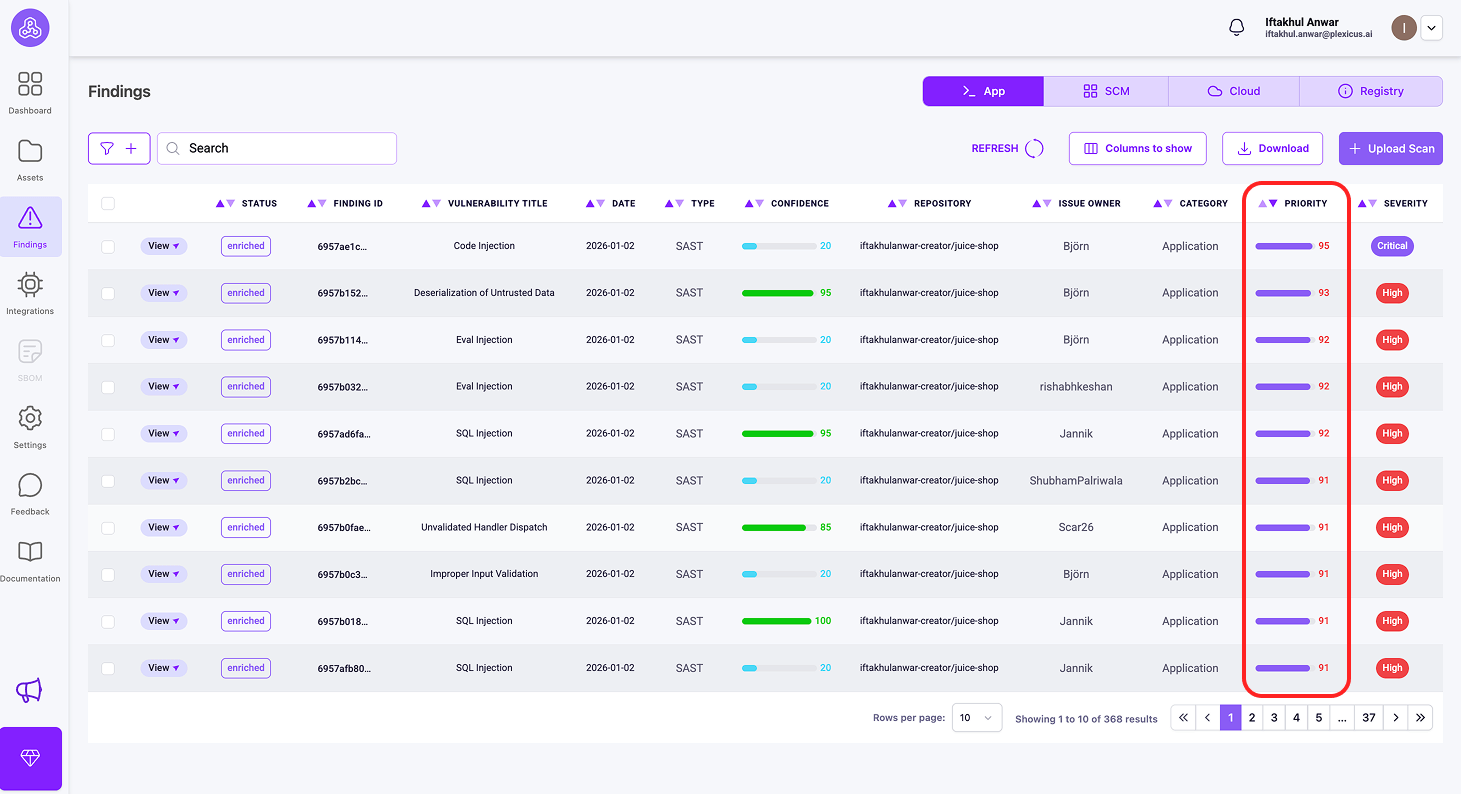
Key Differences
| Metric | Answers | Scope | Range |
|---|---|---|---|
| EPSS | “Are attackers using this?” | Global threat landscape | 0.0-1.0 |
| Priority | “What do I fix first?” | Combined urgency score | 0-100 |
| Impact | “How bad for MY business?” | Organization-specific | 0-100 |
Step 3: Fix Vulnerabilities
This is where most workflows fail. Telling a developer “you have a SQL injection” requires them to research the fix. This friction leads to ignored warnings.
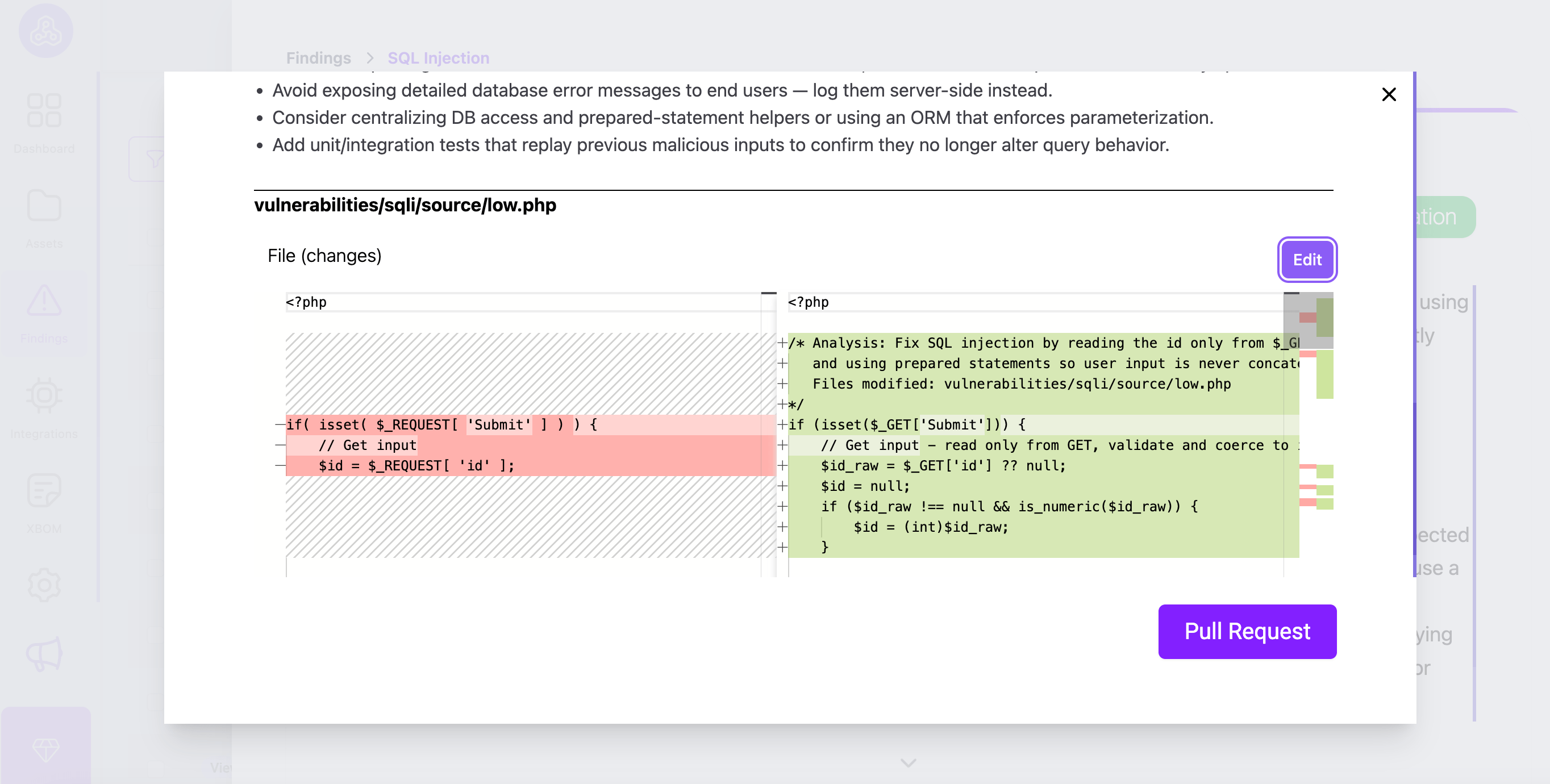
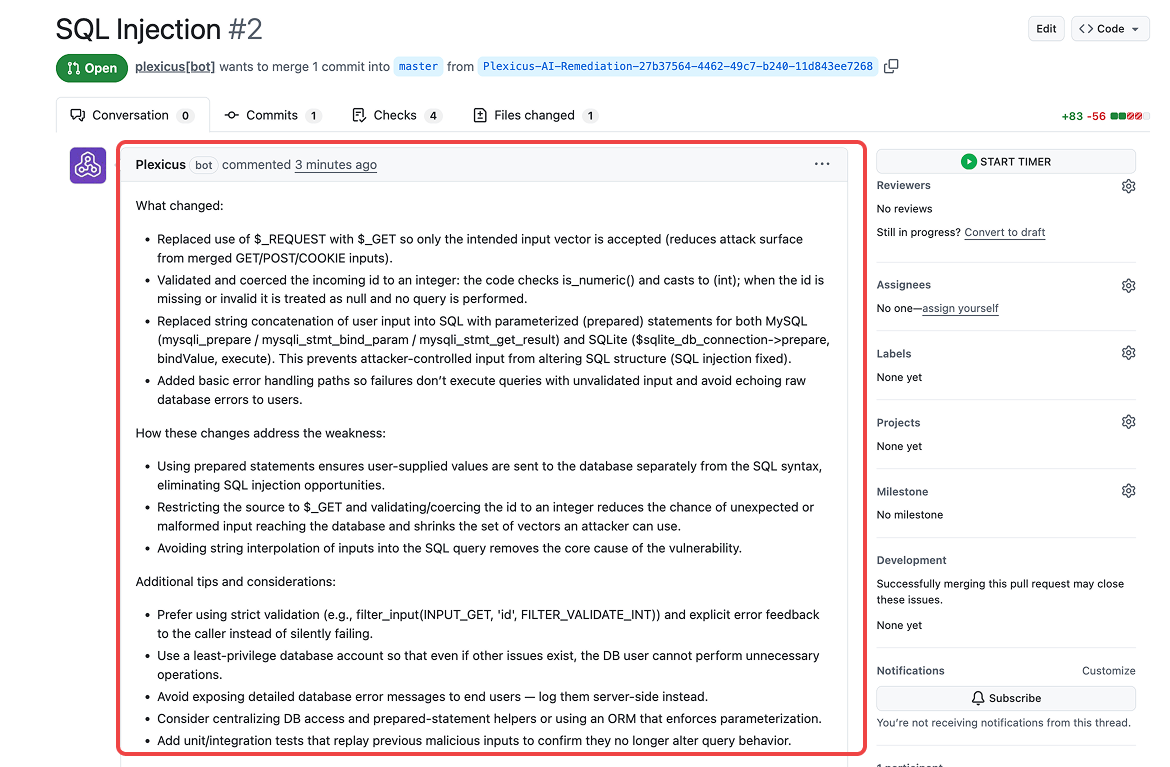
Plexicus fixes vulnerabilities automatically. Instead of just flagging a problem, the plexicus analyzes the vulnerable code block and suggests the exact code fix.
The developer doesn’t need to go to Stack Overflow to find a solution. They simply review the suggested patch and accept it. This transforms a 1-hour research task into a 1-minute review task.
Step 4: PR Decoration
Making a developer open a new tool to view errors is a workflow killer. Findings must appear where the developer is already working.
Plexicus uses PR decorations to post findings directly as comments on the specific lines of code that changed.
- Old way: “Build failed. Check error logs.” (Developer spends 20 mins searching logs).
- New way: Plexicus comments on Line 42: “High Severity: AWS Key detected here. Please remove.”
Step 4: CI Gating
Unlike traditional CI gates that only block, Plexicus automatically generates fixes and creates pull requests with remediation code. This means when a gate blocks a merge, developers receive ready-to-merge fix PRs, reducing friction.
Comparison: Legacy Scanners vs. Plexicus
| Feature | Legacy Security Tools | Plexicus |
|---|---|---|
| Integration Point | Separate Dashboard / Nightly Scan | CI/CD Pipeline (Instant) |
| Feedback Loop | PDF Reports or Console Logs | PR Decorations (In-Flow Comments) |
| Actionability | “Here is a problem” | “Here is the AI Remediation fix” |
| Time to Fix | Days (Context Switch required) | Minutes (During Code Review) |
Key takeaway
Developers don’t ignore security findings because they are lazy. They ignore them because the tools are inefficient and disruptive.
By shifting security into the CI/CD pipeline, you change the dynamic. You aren’t asking developers to “stop working and do security”; you are making security part of the code review they are already doing.
When you use tools like Plexicus, you close the loop completely. You detect the issue in the pipeline, highlight it in the PR, and apply the Plexicus AI remediation fix.
Ready to clean up your pipeline?
Start by scanning your next Pull Request for secrets, and let Plexicus handle fixing. Plexicus seamlessly integrates with popular CI/CD platforms like Jenkins or GitHub Actions, as well as version control systems such as GitHub, GitLab, and Bitbucket. This compatibility ensures it fits smoothly into your existing toolchain, making security enhancement an effortless part of your development workflow.
Plexicus also offers a free Community Tier to help you secure your code immediately. For more details, check the pricing page. Get started today, no cost, no barriers.
Frequently Asked Questions (FAQ)
1. What is Plexicus?
Plexicus is a CNAPP and ASPM platform that integrates directly into your CI/CD pipeline, helping you detect and fix vulnerabilities, secrets, and code issues as soon as code is pushed.
2. How does Plexicus help developers fix vulnerabilities faster?
Plexicus shifts security scanning to the Pull Request (PR) stage, immediately flagging issues and providing suggested code fixes. This reduces the time and effort required for remediation and helps prevent alert fatigue.
3. What types of issues does Plexicus detect?
Plexicus detects multiple types of security issues across the entire SDLC, including: secrets in code (exposed credentials, API keys), static code vulnerabilities (SAST), dependency vulnerabilities (SCA), infrastructure as code misconfigurations, container security issues, cloud security posture, CI/CD pipeline security, license compliance, and dynamic application vulnerabilities (DAST). The platform integrates 20+ security tools to provide comprehensive coverage of application security
4. How does Plexicus prioritize vulnerabilities?
Plexicus uses three key metrics: Priority (combining severity, business impact, and exploitability), Impact (business consequences), and EPSS (likelihood of real-world exploitation). These help teams focus on the most urgent and impactful issues.
5. Does Plexicus automatically fix vulnerabilities?
Yes, Plexicus analyzes vulnerable code and suggests patches that developers can review and accept directly within the PR, minimizing manual research.
6. How are findings communicated to developers?
Findings are posted as PR decorations, comments on specific lines of code within the PR, so developers see them where they already work.
7. What CI/CD platforms and version control systems does Plexicus support?
Plexicus integrates with popular CI/CD platforms like Jenkins and GitHub Actions, and works with version control systems including GitHub, GitLab, and Bitbucket.
8. Is there a free version of Plexicus?
Yes, Plexicus offers a free Community Tier. You can get started at no cost. Check the pricing page for details.
9. Why do developers often ignore security findings?
Developers often ignore findings because security tools can be disruptive, noisy, and time-consuming. Plexicus addresses this by making security part of the existing workflow and providing actionable fixes.