

Alert Fatigue
TL;DR
Alert fatigue happens when teams receive so many notifications that they stop paying attention to them.
What is Alert Fatigue?
Alert fatigue is what happens when security or operations teams are flooded with alerts every day. Over time, people get tired, stressed, and start ignoring them.
In security, this usually comes from tools that alert on everything, real issues, small issues, and things that aren’t problems at all.
When every alert feels critical, none of them feel truly urgent anymore. The brain learns to tune them out, like an alarm that goes off too often.
Why Alert Fatigue Is Dangerous
Alert fatigue isn’t just annoying. It’s risky.
Many major security breaches happened even though alerts were triggered. The problem was that no one noticed or reacted in time.
Main risks:
1. Real threats get ignored.
When most alerts are false alarms, real attacks look the same and get missed.
2. Slow response
Time spent reviewing useless alerts is time not spent fixing real problems.
3. Human mistakes
Tired teams make mistakes, skip steps, or misjudge risk.
Why Alert Fatigue Happens
Alert fatigue usually comes from a mix of bad tooling and poor setup.
Common causes:
- Too many false positives
- Tools flag possible issues without checking if they can actually be exploited.
- No real prioritization
- Everything gets the same severity, even when the risk is very different.
- Duplicate alerts
- Multiple tools report the same issue in different ways.
- Rigid rules
- Alerts trigger based on fixed limits instead of real behavior.
How to Reduce Alert Fatigue
The only real fix is reducing noise and focusing on what matters.
Focus on Real Risk
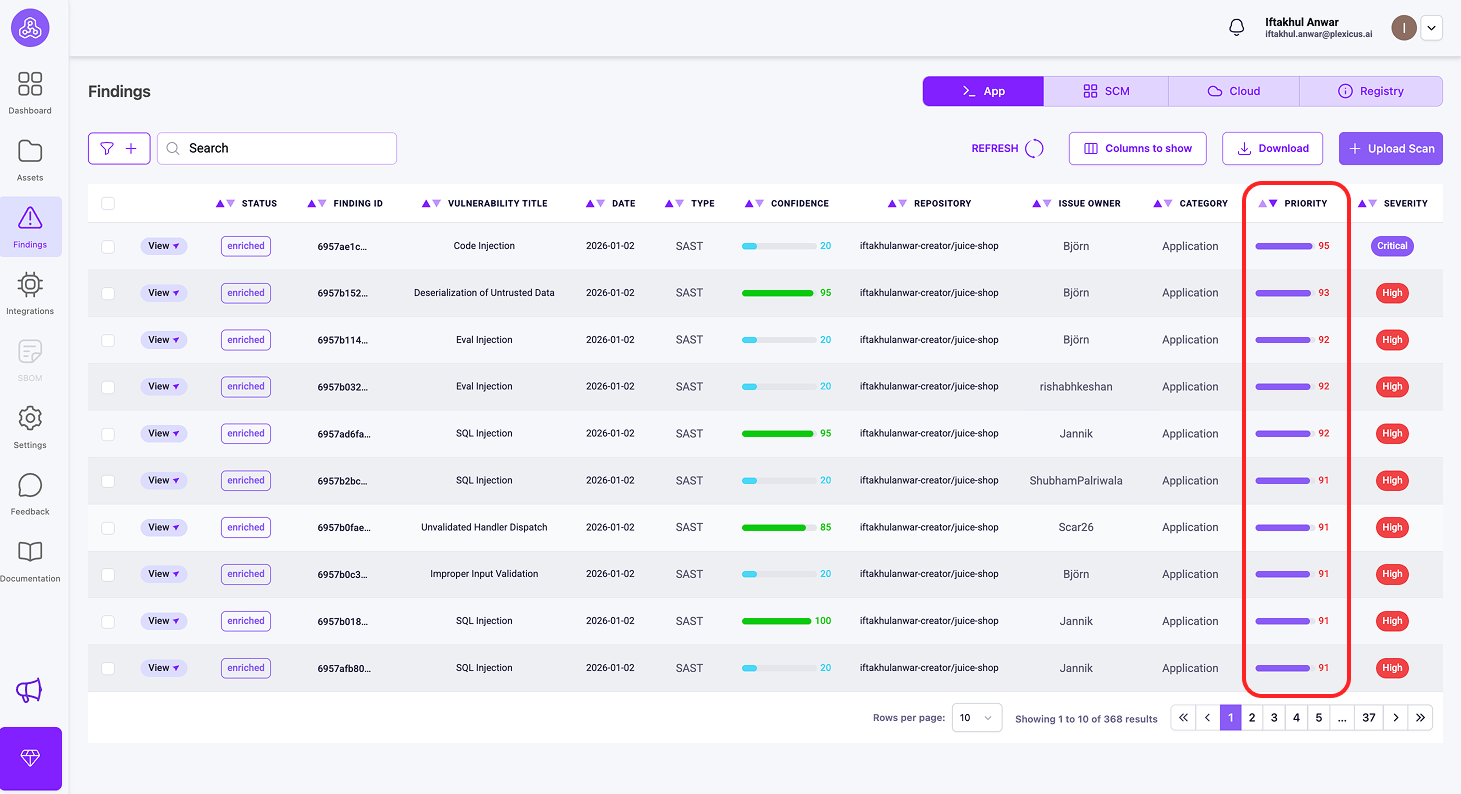
Not all issues are equal. Plexicus provides some metrics to help you prioritize vulnerabilities:
1) Priority metrics
What it measures: Overall urgency for remediation
It is a score (0-100) that combines technical severity (CVSSv4), business impact, and exploit availability into one number. It’s your action queue - sort by Priority to know what to tackle immediately. Priority 85 means “drop everything and fix this now”, while Priority 45 means “schedule it for next sprint.”
Example: SQL injection in an internal productivity tool, only accessible from the corporate VPN, does not contain sensitive data
- CVSSv4: 8.2 (high technical severity)
- Business Impact: 45 (internal tool, limited data exposure)
- Exploit Availability: 30 (requires authenticated access)
- Priority: 48
Why Look for Priority: Despite a high CVSSv4 (8.2), Priority (48) correctly downgrades urgency because of limited business impact and low exploitability. If you only looked at CVSS, you’d panic unnecessarily. Priority says: “Schedule this for next sprint,” with a score of around 45.
This makes the “next sprint” recommendation much more reasonable - it’s a real vulnerability that needs fixing, but not an emergency because it’s in a low-impact internal tool with limited exposure.
2) Impact
What it measures: Business consequences
Impact (0-100) evaluates what happens if the vulnerability is exploited, considering your specific context: data sensitivity, system criticality, business operations, and regulatory compliance.
Example: SQL injection in a public-facing customer database has Impact 95, but the same vulnerability in an internal test environment has Impact 30.
3) EPSS
What it measures: Real-world threat likelihood
EPSS is a score (0.0-1.0) that predicts the probability that a specific CVE will be exploited in the wild within the next 30 days
Example: A 10-year-old vulnerability might have CVSS 9.0 (very severe), but if no one is exploiting it anymore, EPSS would be low (0.01). Conversely, a newer CVE with CVSS 6.0 might have EPSS 0.85 because attackers are actively using it.
You can check these metrics for prioritization by following these steps:
- Ensure that your repository is connected and the scanning process has finished.
- Then go to the Findings menu, where you’ll find the metrics you need for prioritization.
Key Differences
| Metric | Answers | Scope | Range |
|---|---|---|---|
| EPSS | “Are attackers using this?” | Global threat landscape | 0.0-1.0 |
| Priority | “What do I fix first?” | Combined urgency score | 0-100 |
| Impact | “How bad for MY business?” | Organization-specific | 0-100 |
Add Context
If a vulnerable library exists but your app never uses it, that alert should not be high priority.
Tune and Automate
Teach tools over time what is safe and what is not. Automate simple fixes so people only handle real threats.
Use One Clear View
Using a single platform like Plexicus helps remove duplicate alerts and shows only what needs action.
Alert Fatigue in Real Life
| Situation | Without Noise Control | With Smart Alerting |
|---|---|---|
| Daily alerts | 1,000+ | 15–20 |
| Team mood | Overwhelmed | Focused |
| Missed risks | Common | Rare |
| Goal | Clear alerts | Fix real issues |
Related Terms
FAQ
How many alerts are too many?
Most people can only properly review about 10–15 alerts a day. More than that usually leads to missed issues.
Is alert fatigue only a security problem?
No. It also happens in healthcare, IT operations, and customer support. In security, the impact is worse because missed alerts can lead to serious breaches.
Does turning off alerts make things worse?
If alerts are turned off without thought, yes.
If alerts are reduced based on real risk and context, security actually improves.